Pledge Types
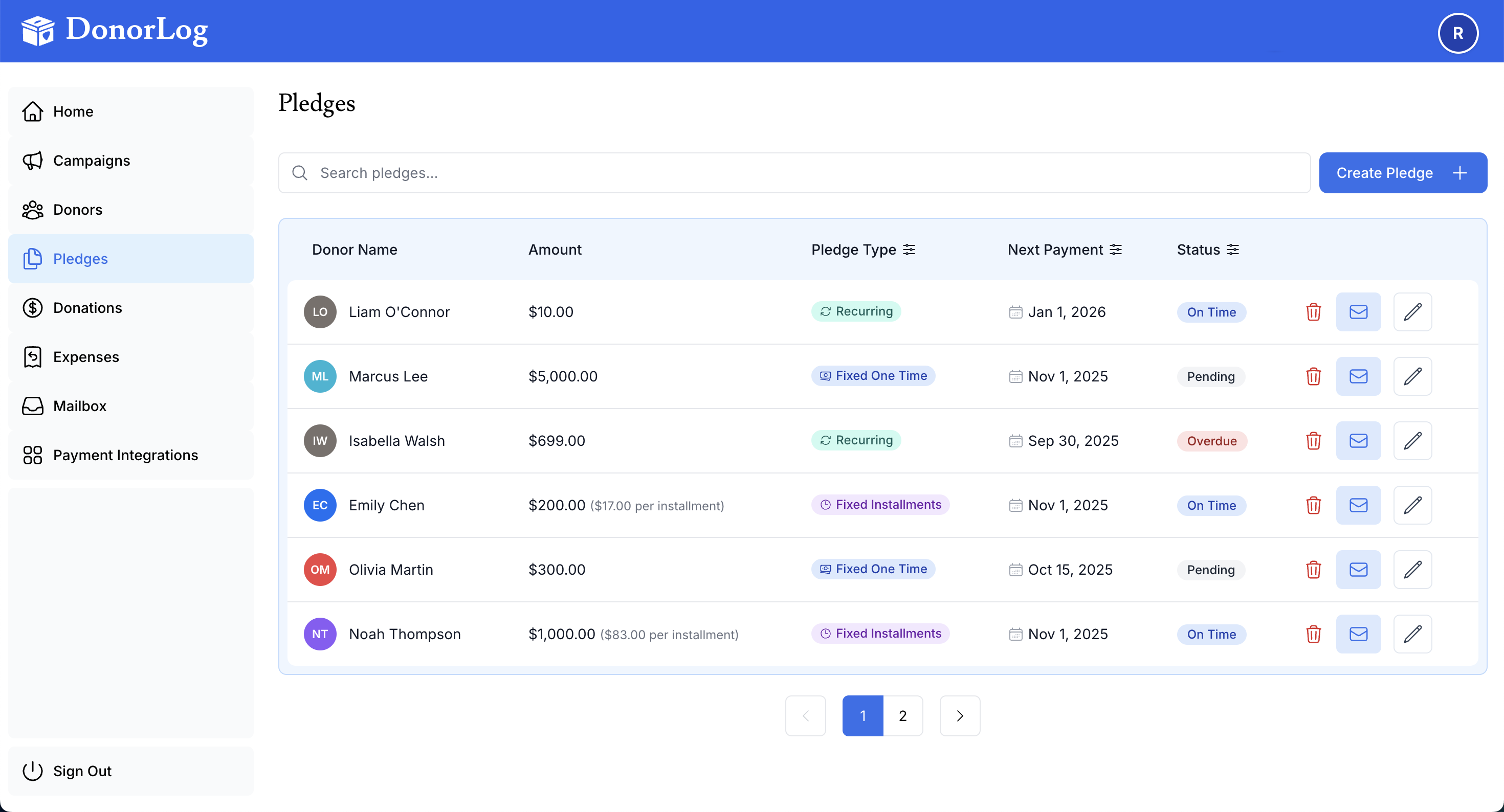
Understanding different pledge types helps you accurately track donor commitments. This guide explains the pledge types available in DonorLog.
Overview
Pledges can be structured in different ways depending on the donor's commitment. DonorLog supports various pledge types to accommodate different giving patterns.
Fixed One-Time Pledge
A Fixed One-Time Pledge is a single commitment for a specific amount to be paid once.
Characteristics
- Single payment commitment
- Specific total amount
- One payment date
- Simple to track
When to Use
- One-time large donations
- Special event commitments
- Annual giving commitments paid in one installment
- Donors who prefer to pay the full amount at once
Example
Donor: John Smith
Campaign: Building Fund
Pledge Type: Fixed One-Time
Amount: $1,000
Payment Date: March 1, 2024
Payment Type: Cheque
Creating a Fixed One-Time Pledge
- Select "Fixed One-Time" as the pledge type
- Enter the total amount
- Set the payment date
- Choose the payment type
- Save the pledge
Recurring Pledge
A Recurring Pledge is a commitment to make regular payments over a period of time.
Characteristics
- Multiple payments over time
- Regular payment schedule
- Total amount spread across installments
- Automatic payment date calculation
When to Use
- Monthly giving programs
- Quarterly commitments
- Annual pledges paid in installments
- Sustainer programs
Example
Donor: Jane Doe
Campaign: General Fund
Pledge Type: Recurring
Total Amount: $1,200
Frequency: Monthly
Installment Amount: $100
Number of Installments: 12
Start Date: January 1, 2024
End Date: December 31, 2024
Payment Type: Credit Card
Creating a Recurring Pledge
- Select "Recurring" as the pledge type
- Enter the total pledge amount
- Choose the frequency (Monthly, Weekly, Quarterly, Annually)
- Set the installment amount
- Set the number of installments
- Set start and end dates
- Choose the payment type
- Save the pledge
Payment Frequencies
For recurring pledges, you can choose from:
Weekly
- Payments every week
- 52 payments per year
- Good for small, frequent donations
Monthly
- Payments every month
- 12 payments per year
- Most common frequency
- Easy for donors to budget
Quarterly
- Payments every 3 months
- 4 payments per year
- Good for larger amounts
- Less frequent than monthly
Annually
- One payment per year
- Good for annual commitments
- Simplest recurring schedule
Pledge Amounts
Total Amount
The complete amount the donor has committed to give.
Example: $1,200 total pledge
Installment Amount
The amount of each individual payment (for recurring pledges).
Example: $100 per month for 12 months = $1,200 total
Calculating Installments
For recurring pledges:
- Total Amount ÷ Number of Installments = Installment Amount
- Or set the installment amount and calculate total
Payment Types for Pledges
Pledges can be paid using any payment type:
- Cash - For in-person recurring payments
- Cheque - Monthly or quarterly cheques
- Credit Card - Automatic recurring payments
- E-Transfer - Regular electronic transfers
Choosing the Right Pledge Type
Consider these factors:
- Donor Preference: How does the donor want to pay?
- Amount: Is it a large one-time amount or spread over time?
- Campaign Needs: Does the campaign need funds immediately or over time?
- Administration: Which is easier to track and manage?
Tracking Pledge Progress
The system automatically tracks:
- Total Pledged - The full commitment amount
- Total Paid - Amount received so far
- Remaining Balance - Amount still owed
- Next Payment Date - When the next payment is due
- Payment Status - On time, overdue, or completed
Modifying Pledges
You can modify pledges if needed:
- Extend End Date - If donor needs more time
- Adjust Amount - If commitment changes
- Change Frequency - If payment schedule changes
- Skip Payments - If donor needs to skip a payment
- Cancel Pledge - If commitment is cancelled
Common Scenarios
Scenario 1: Monthly Sustainer
Type: Recurring
Frequency: Monthly
Amount: $50/month
Duration: Ongoing (no end date)
Payment: Credit Card (automatic)
Scenario 2: Annual Commitment
Type: Fixed One-Time
Amount: $500
Payment Date: January 1st
Payment: Cheque
Scenario 3: Quarterly Large Donation
Type: Recurring
Frequency: Quarterly
Amount: $1,000/quarter
Duration: 4 payments
Payment: E-Transfer
Scenario 4: Event Pledge
Type: Fixed One-Time
Amount: $250
Payment Date: Event date
Payment: Cash or Credit Card
Best Practices
- Match Donor Preference: Use the type the donor prefers
- Be Clear: Explain the commitment clearly to donors
- Set Reminders: Use the system to send payment reminders
- Track Accurately: Link all payments to the correct pledge
- Be Flexible: Adjust if donors need changes
Related Topics
- Creating Pledges - Step-by-step guide
- Tracking Payments - How to record payments
- Managing Pledges - Updating and modifying pledges
Ready to create a pledge? Learn how to create pledges!